Type Sprint: Typing Games
- 4.5
- Rating
- 10.00M
- Installs
- Free
- Price
 Analysis by App-foxy
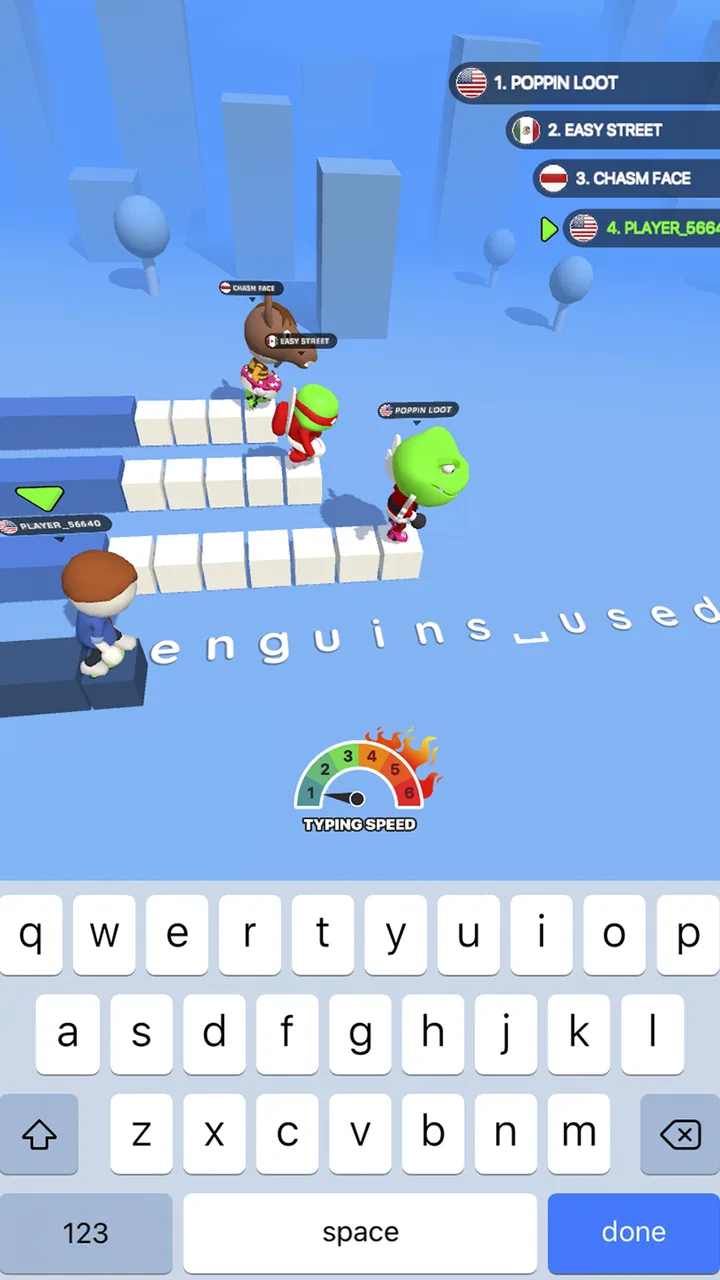
Typing games usually ask for quick fingers, but Type Sprint: Typing Games adds a playful running-race layer to that familiar idea. I found the basic appeal easy to understand: words appear as part of a race, and typing them correctly helps the character move forward. It feels more like a short arcade challenge than a traditional typing tutor, which makes it a natural fit for spare moments when I want something active rather than a lesson.
Developed by Masterskaya DK, this free trivia game is aimed at Everyone and runs on Android 7.1 or later. Its store summary describes a fast typing race with a three-dimensional runner presentation, and that combination is important to the experience: the typing is the real input, while the running battle gives each answer an immediate visual consequence. The game has reached over ten million installs, with a 4.4 average from around 116 thousand ratings, so it has clearly found a sizable audience.
How the game feels to read and navigate
My first impression is that the concept is much easier to grasp than the name might suggest. You do not need to study a complicated rule set before starting. The central task is visible quickly: read the text, type it, and watch the race respond. That direct relationship between input and movement keeps the opening experience friendly for people who are not regular typing-game players.
You May Also Like

 Blood Strike: 2.5 Anniversary
Blood Strike’s Loadouts Turn Every Drop Into a Tactical Gamble
A close look at Blood Strike’s custom loadouts: how fast access to signature weapons reshapes its battle royale rhythm, rewards preparation, and narrows the gap between fights.

 Pandora - Music & Podcasts
Pandora’s Music Is Easy to Start, but Harder to Recover
Pandora’s strength is its low-effort path from a seed to a station. Its weak spot is how much confidence it asks you to place in connection, setup, and quiet recovery.

 8 Ball Pool
 Is Built on Rivalries, Rematches, and Routine
A close look at the rivalries, rematches, shared routines, and unanswered safety questions that turn a quick pool match into a persistent mobile community.

 Samsung Music
’s Quiet Strength Is Playing What You Already Own
Its reach comes less from spectacle than from dependable access to a personal library. That simplicity is both the app’s strongest retention engine and its ceiling.

 AccuWeather: Weather Radar
AccuWeather Review: A Quick, Clear Forecast for Everyday Decisions
For everyday plans, the best forecast is the one you can understand quickly. AccuWeather makes rain timing, radar, and local conditions easy to act on, with a few trade-offs.

 Hill Climb Racing
Why Hill Climb Racing Still Turns Crashes Into One More Run
A tiny car, a bumpy hill and one more upgrade: Hill Climb Racing keeps resurfacing because its simple chaos makes every near-miss feel personal.
More From Our News Desk
View All News


The three-dimensional running presentation gives the screen more energy than a plain text exercise. Instead of staring at a static line of words, I am encouraged to look between the text and the runner. That visual feedback helps explain why accuracy matters, although it also means the game can feel busier than a conventional typing practice tool. Players who prefer a quiet, uncluttered interface may find the race presentation more distracting than motivating.
Navigation is best understood as part of the arcade design rather than as a full learning platform. I would approach it expecting quick rounds and immediate interaction, not detailed lessons about home-row placement, finger technique, or typing posture. That distinction matters. Someone trying to build reliable keyboard habits may learn more from a dedicated typing tutor, while someone who already knows the basics can use this game as a more entertaining speed exercise.
The current version is 1.13.1, and the overall identity remains focused: type to progress through a running contest. I like that focus because it avoids turning a simple idea into a cluttered productivity tool. At the same time, players looking for extensive menus, structured courses, or deep performance analysis should keep their expectations modest. The strongest part of the design is the immediate race loop, not a broad educational system.
Readability during a fast round
Typing while watching a moving scene creates a different reading challenge from typing in a document. I found it useful to focus on the next short piece of text rather than trying to monitor the entire screen at once. This is also a practical tip for anyone who gets overwhelmed by motion: treat the text as the primary workspace and the runner as feedback, not as something that must be watched continuously.
That approach makes the game more manageable, but it does not remove every visual demand. A player may need to shift attention between written characters, the on-screen keyboard or typing area, and the race itself. For users with visual fatigue, motion sensitivity, or difficulty distinguishing small text from a colorful background, longer sessions may become uncomfortable. I would recommend short attempts with regular breaks rather than treating it as an uninterrupted practice session.
The game’s simplicity is helpful for younger players and casual users because the objective does not require much reading outside the actual challenge. Its Everyone rating also makes it suitable for a broad age range in terms of content. Still, age suitability is not the same as universal ease of use. A child who is still learning letter recognition, or an adult unfamiliar with the QWERTY layout, may need patience before the race becomes enjoyable rather than frustrating.
Motor, sensory, and situational access
The main physical demand is repeated, accurate tapping or typing at speed. That makes the game naturally more accessible to people who can comfortably use a touchscreen keyboard, but less comfortable for anyone with limited fine-motor control, hand tremors, joint pain, or fatigue triggered by repeated small movements. The race format adds pressure because hesitation is not neutral: it can affect progress, so a slower pace may feel like failure even when the player is learning.
One useful way to make the experience less demanding is to change the goal. Instead of chasing a perfect result, I would use early sessions to identify which letters or transitions cause mistakes. A player can deliberately slow down, concentrate on accuracy, and only increase speed after the text feels familiar. This turns the game into a low-pressure practice tool, although it cannot replace a typing app designed specifically around gradual accessibility or adaptive instruction.
Touchscreen typing also depends heavily on the device. A larger phone may give more room for key separation, while a compact screen can make neighboring keys easier to hit accidentally. Someone who normally types with an external keyboard may find the on-screen layout less comfortable, especially during a fast round. Conversely, the phone-based format is convenient for people who do not have access to a desktop setup. That trade-off is central to deciding whether this game fits your routine.
Sensory needs deserve equal attention. The running scene and competitive feedback can make the game feel lively, but motion and visual changes may bother players who are sensitive to animated movement. Audio can also affect comfort if the game is played in a quiet room or around other people, although I would not assume that every player wants or needs sound. A practical approach is to begin in a calm setting, keep the first session brief, and stop if the combination of typing pressure and movement becomes tiring.
When it works well in everyday life
I can see myself using it while waiting for an appointment or during a short break when I want an activity that ends quickly. It is more engaging than opening a blank document and copying text, yet it does not demand the long commitment of a full game session. A student could use a few rounds to wake up their fingers before writing, while a casual player might use it simply for the satisfaction of beating a previous performance.
It is also a reasonable choice for someone who wants to practice on a phone rather than a computer. The game’s race structure supplies motivation that ordinary typing drills often lack. Instead of repeating lines with no visible consequence, I get a clear sense of forward movement. That is a genuine strength for users who abandon practice tools because they feel too much like homework.
However, the same short-session design limits its usefulness in other situations. I would not choose it as my only method for learning touch typing from scratch, preparing for a typing test, or correcting inefficient finger habits. A conventional tutor is better when I need explanations, progressive exercises, and a careful breakdown of errors. Type Sprint is strongest when the goal is to make repeated typing practice feel like a quick contest.
Different abilities and shared spaces
The game can support different ability levels mainly through the player’s own pace and expectations. Beginners can treat it as a gentle introduction to typing under pressure, while experienced users can focus on speed and consistency. That flexibility is useful, but it is informal rather than a clearly structured accessibility system. I would not expect the game to automatically reshape the experience around a particular motor, visual, or cognitive need.
For shared spaces, the phone format is convenient because it does not require a desk or a full keyboard. It can be played discreetly during a break, and the short rounds make it easier to stop when someone needs your attention. On the other hand, a bright animated game may be unsuitable in situations where screen movement is distracting, such as a classroom, a meeting, or a quiet waiting area. In those moments, a plain typing exercise may be the more considerate option.
There is also a social accessibility angle. Some players enjoy competition because the running battle gives them an obvious reason to continue. Others may find the competitive framing discouraging, particularly if they type slowly or make frequent mistakes. I would recommend judging success by personal improvement rather than by the runner’s position. That small change in mindset makes the game more welcoming without pretending that the underlying speed pressure has disappeared.
Where the experience still creates friction
The biggest limitation is the tension between entertainment and careful learning. A race rewards quick input, but quick input is not always the best way to build accuracy. If I rush, I may reinforce sloppy habits, especially when I repeatedly reach for keys with the wrong fingers or glance away from the text. The game can encourage practice, but the player has to supply the discipline that a more instructional app would build into its lessons.
Another barrier is the dependence on visual attention. The player needs to read characters accurately while responding to a moving presentation. That may be fine for short periods, but it can be demanding for users with dyslexia, low vision, attention differences, or sensitivity to motion. I would be cautious about recommending it as a primary tool for those users unless they have already tried the interface and found the text comfortable to follow.
Typing speed can also be affected by language and keyboard familiarity. A player who is comfortable with the QWERTY layout will likely settle in more quickly than someone accustomed to another arrangement or a different writing system. Even within English, unfamiliar words can slow recognition before the fingers move. That is not necessarily a flaw in the game, but it means performance may reflect reading familiarity as much as typing skill.
The free price makes experimentation easy, and that lowers the risk of trying it for a few rounds. Still, free access alone does not guarantee that it will suit every learner. If a user needs large text, reduced movement, one-handed operation, switch access, voice input, or detailed customization, a specialized alternative may be a better starting point. I would rather recommend the right tool than insist that an arcade typing game cover needs it was not built around.
There is a useful trade-off between immediacy and depth here. The game’s strongest quality is that I can begin quickly and understand the purpose without a manual. Its weakness is that the same streamlined approach leaves fewer opportunities for deliberate correction. For a player who wants motivation, that is acceptable. For a player who wants a complete typing curriculum, it is a clear reason to look elsewhere.
Who should try it, and who should skip it
I would recommend Type Sprint to casual gamers, students who want a livelier way to practice, and people who already type reasonably well but enjoy chasing better consistency. It is especially appealing if you like short challenges, visible progress during a round, and the feeling that practice has an arcade payoff. The free download and broad Everyone rating also make it easy to test without a major commitment.
I would suggest skipping it, or at least pairing it with another tool, if your priority is formal typing instruction. Users who need ergonomic guidance, adaptive exercises, extensive statistics, or a low-stimulation interface will probably be happier with a dedicated tutor. The same applies to anyone who finds competitive speed pressure stressful. A slower, non-racing exercise can be more productive when the goal is confidence rather than excitement.
One practical workflow is to use a conventional typing lesson first and then play a few rounds here as a reward. The lesson can handle technique and accuracy, while the race adds motivation and a change of pace. Another is to use the game only after identifying a specific weakness, such as hesitation between neighboring keys. In that role, it becomes a focused drill rather than an attempt to make it your entire learning plan.
My inclusive verdict after using it
Type Sprint: Typing Games succeeds because it gives typing a clear physical consequence: correct input helps a runner advance. That simple connection makes practice more inviting than a static exercise, and it explains why the game has attracted a large audience. The 4.4 average and over ten million installs suggest strong general appeal, while the free model makes it approachable for curious players.
My recommendation comes with an important qualification: its accessibility is shaped by the player’s device, typing ability, visual comfort, and tolerance for speed pressure. It is easy to understand, quick to start, and suitable for short everyday sessions, but it is not a substitute for a fully adaptable typing course. Players with motor or sensory needs should test the pace and visual presentation gently, using short sessions and personal improvement as the measure of success.
For me, the best place for this game is between practice and play. I would use it to make a dull break more engaging, to warm up before writing, or to keep typing familiar without opening a formal lesson. I would not rely on it alone for serious skill development. If you want typing practice that feels like a quick race rather than a classroom exercise, this is a fun and accessible place to start—provided the motion, screen size, and speed demands work comfortably for you.
FAQs for Type Sprint: Typing Games
01What is Type Sprint: Typing Games?
Type Sprint: Typing Games is an engaging app designed to improve your typing speed and accuracy through fun and competitive gameplay. It offers various levels and challenges that cater to both beginners and advanced typists, making it suitable for all skill levels.
02Is Type Sprint suitable for beginner typists?
Yes, Type Sprint is suitable for beginners. The app features a range of levels starting from basic to advanced, allowing users to gradually improve their typing skills. Its user-friendly interface and tutorial section make it easy for newcomers to get started.
03Does Type Sprint require an internet connection?
Type Sprint primarily functions offline, allowing users to enjoy the game anytime and anywhere. However, an internet connection is required for certain features, such as leaderboard updates and multiplayer challenges, which enhance the overall experience.
04Are there any in-app purchases in Type Sprint?
Yes, Type Sprint offers in-app purchases. While the basic version is free to download, users can opt for additional features, such as new levels and ad-free gameplay, through in-app purchases to enhance their experience.
05How does Type Sprint help improve typing skills?
Type Sprint improves typing skills by offering a variety of typing challenges that focus on speed and accuracy. The app tracks performance metrics, providing feedback and progress reports, which help users identify their strengths and areas for improvement, making practice both effective and enjoyable.
Pros
- Engaging and fun way to improve typing speed.
- Wide variety of levels and challenges.
- User-friendly interface for all ages.
- Regular updates with new content.
- No intrusive ads during gameplay.
Cons
- Limited offline functionality.
- In-app purchases can be pricey.
- Some levels are repetitive.
- Requires an internet connection.
- May not support all keyboards.

Type Sprint: Typing Games
Gallery